Express Checkout with Google Pay & Apple Pay
Already saved your card to Google Pay or Apple Pay? Renew in seconds. Just tap to confirm.
Why Express Checkout
Tap. Confirm. Done.
For Malaysians who manage everything from their phone, if your card is already saved in Google Pay or Apple Pay, there's no retyping. Tap, confirm with your fingerprint or Face ID, and your renewal is done in seconds.
How it works
Complete your renewal details
Enter your vehicle plate number or IC with HOI as usual and get your instant insurance, takaful and road tax quote.
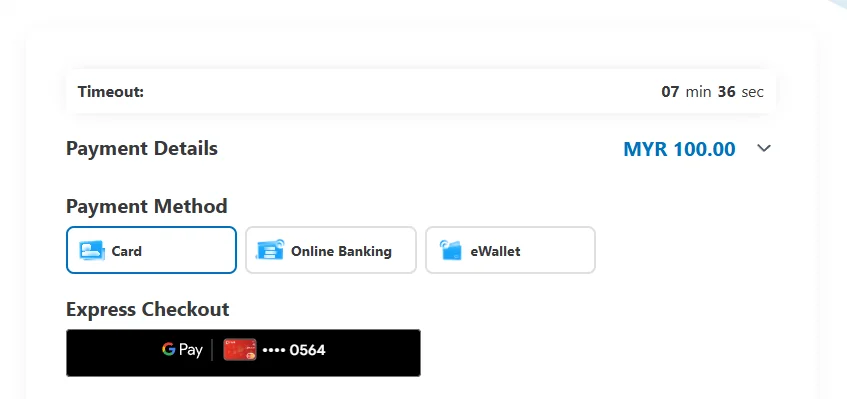
Look for 'Express Checkout' at checkout
On the payment page, Express Checkout buttons appear above the regular card form.
Tap 'G Pay' or Apple Pay
Select Google Pay, or Apple Pay where supported by your browser and device.
Confirm with biometrics
Approve the payment using your fingerprint or Face ID. No card number or CVV to type.
Get instant confirmation
Your insurance, takaful and road tax are processed immediately, with an email receipt sent right away.
Apple Pay availability depends on your browser and device. Where unavailable, use Credit/Debit Card or any other method on this page.
Frequently asked questions
Express Checkout with HOI


Ready to renew now?
Get an instant insurance, takaful and road tax quote in minutes. Pay with whichever method suits you at checkout.
Not ready yet?
Set a free reminder and we'll WhatsApp, SMS and email you before your insurance or road tax expires, so you can pay when the time is right.
Payments are processed securely. See our Refund Policy for cancellation terms.